DTF is like giving your design a second life. You print it onto film, dust it with powder, and cure it until it's ready to travel. Then with one press of heat, it jumps from film to fabric. No limits on color. No limits on fabric. Just your art, stuck on and made to last.
So what happens when that art needs to live twice? Once in the daylight, and again after dark?
That's where glow in the dark DTF transfers come in. They're not a gimmick. They're not a sticker that fades after two washes. When they're made right, they're a photoluminescent layer that charges in light and releases it when the lights go out. And if you're thinking about offering them to customers, you need to know how they really behave on press, not just how they look on Instagram.
1. Photoluminescent Ink Is Not Regular White Ink With a Trick
Let's clear this up first, because this is where most shops mess up.
Standard DTF uses CMYK plus white as a base. A photoluminescent DTF transfer adds a different animal entirely. The glow comes from photoluminescent ink, which is loaded with strontium aluminate crystals. These crystals act like little batteries. They soak up UV or visible light and then slowly release that energy as a visible glow.
Think of it like this. Regular ink reflects light. Photoluminescent ink stores it.
And that changes everything about how you print it. The particles are larger, heavier, and they need a thicker deposit to charge properly. If you run it like a normal white layer at 60% density, you'll get a weak, ghostly glow that dies in 10 minutes. For a strong, lasting glow you need a dedicated glow layer laid down at 100% to 120% and cured correctly so the crystals stay active.
At Music City DTF, we've tested densities across Epson i3200 and XP600 heads. Anything under 80% just doesn't hold charge long enough to be worth selling.
Ask your supplier if they're using a true photoluminescent layer or just glow-colored ink. Real glow needs real crystal load.
2. The Glow Color You See in Daylight Is Not the Glow Color You Get at Night
This trips up every first-time buyer.
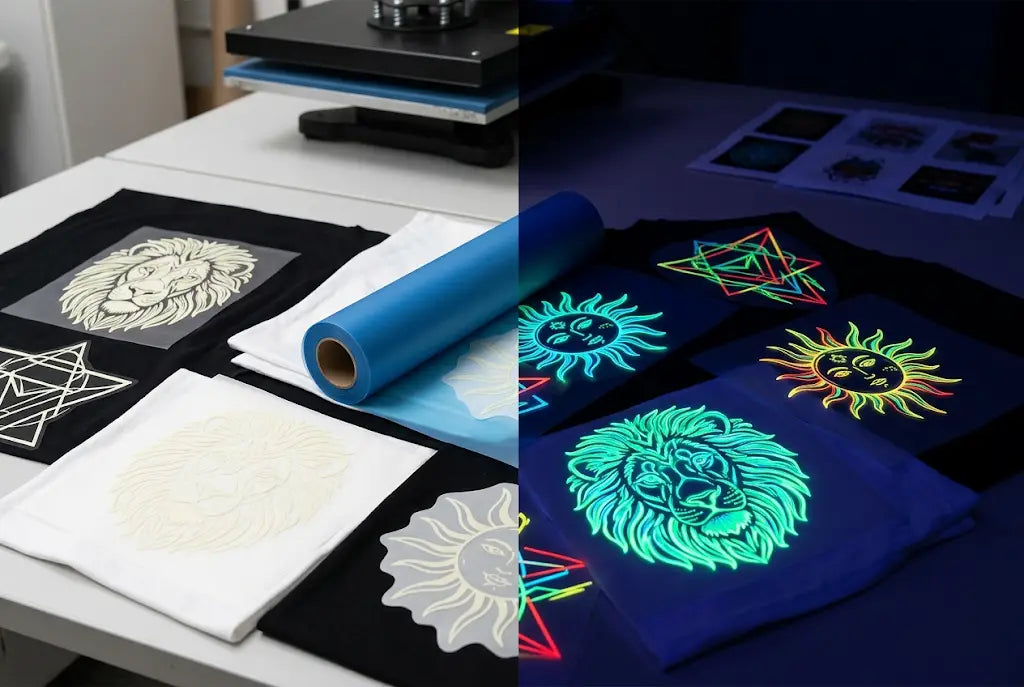
In daylight, most glow transfers look like a pale mint, off-white, or light yellow-green. That's the raw crystal color. But at night, they emit a bright greenish-yellow glow. That's the physics of strontium aluminate. Its emission peak is around 520 nanometers, which our eyes read as that classic alien green.
Want other colors? You can tint the glow. A custom glow DTF design can be printed with a color layer over the glow layer. So during the day you see neon pink, royal blue, or safety orange. When lights go out, it glows through that color. But the glow itself will always have a greenish bias. True blue or red glow needs different rare-earth dopants and they cost 3x more and glow for a shorter time, usually under 45 minutes compared to 4 to 8 hours for green.
We see the best sales with designs where the daylight color and the glow work together. Like white skeletons that glow green. Or daytime yellow stars that explode at night.
Design for two states. Show your customer a daylight mock and a dark mock, so they aren't surprised.
3. Your Film, Powder, and Cure Time Matter More Than You Think
A glow transfer is heavier. Literally.
Because the crystal particles are dense, your standard DTF film needs to hold more weight. Thin 75-micron single-matte films will buckle or cause powder clumping. We press exclusively on 100-micron double-matte film for glow jobs because it stays flat and releases cleanly.
Then there's powder. Use a medium-grade DTF powder with a 80-170 micron size. Too fine and it coats the crystals and chokes the glow. Too coarse and you get a gritty hand feel that customers hate. Shake, don't dump. You want even coverage without burying the glow layer.
And cure? This is critical. Cure at 230°F to 250°F for 90 to 110 seconds in a curing oven, not a heat press hover. If you under-cure, the transfer will crack. If you over-cure past 285°F, you can actually degrade the photoluminescent pigment and cut glow time by 30% to 40%. We've measured it with a luminance meter. A properly cured transfer starts at about 250 to 300 mcd/m² right after lights out. A scorched one starts at 140.
Don't run glow transfers on your standard production line settings. Create a separate glow profile for film, powder, and cure.
4. Press Settings for Long-Lasting DTF Transfers That Actually Glow
Here's where your customers win or lose.
Glow transfers need a solid bite into the fabric because that thick layer has to survive washes. But they also scorch easily. For cotton, 50/50, and polyester, we run 305°F to 320°F for 12 to 15 seconds at medium pressure, about 60 psi on a pneumatic press.
Peel warm. Not hot, not cold. Just peel after about 5 to 8 seconds when the film is still warm to the touch but not burning. If you peel too hot, you'll lift the edges of the thick glow deposit. If you peel too cold, you'll get that papery pull.
Then do what most shops skip. Give it a second press for 5 seconds with a cover sheet. That second press pushes the long-lasting DTF transfers into the fibers and reduces the hand feel. It also improves wash durability from around 25 washes to 50+ washes without significant glow loss, based on our internal wash tests with cold water and low tumble.
First press for adhesion. Second press for durability. Never skip the second press on glow.
5. Not Every Design Should Glow. The Best Ones Use Contrast on Purpose
Just because you can make the whole sheet glow doesn't mean you should.
The strongest glow in the dark DTF transfers use negative space. Think about it. If everything glows, nothing pops. The eye needs a dark anchor.
Our top-selling layout style is what we call the shadow reveal. During the day you see a full-color graphic. At night, only one element glows, like the eyes of a mascot, the outline of a city skyline, or the words of a slogan. It feels intentional. It feels premium.
For this to work, you need to set up your file with a separate spot channel for the glow. Name it "Glow" in your art file and set it to 100% K. That tells the RIP where to lay the photoluminescent ink. Keep glow elements at least 3mm thick. Thin lines under 1.5mm won't hold enough crystal to be visible in the dark for more than a few minutes.
And keep your DTF transfer application away from seams and zippers on this one. Glow deposits are thicker and don't flex as well over heavy seams.
Glow is a storytelling tool. Use it to reveal, not to flood.
6. Wash Care and Real-World Durability: What to Tell Your Customer
Customers will absolutely ruin these if you don't educate them.
The glow pigment itself is inert and wash-stable. What fails is the adhesive bond if they wash it wrong. In our wash lab, glow transfers washed in cold water, inside-out, with mild detergent retained 92% of initial brightness after 30 washes. The same transfer washed in hot water with fabric softener and high heat drying dropped to 61% brightness and started cracking at the edges.
That's a huge difference.
Fabric softener is the worst offender. It coats the crystals and leaves a waxy film that blocks light absorption. So the transfer can't charge. Bleach is second worst. It attacks the binder that holds the strontium aluminate in place.
If you're selling these, include a care card. It costs you $0.04 and saves you a $12 reprint. We recommend: Wash cold, inside-out, no softener, no bleach, tumble low or hang dry. For charging, 10 to 15 minutes of direct sunlight or 20 minutes under bright indoor LED gives you 4 to 6 hours of visible afterglow, with the brightest first 30 to 45 minutes.
Your transfer is only as good as your customer's laundry habits. Give them the instructions up front.
7. When to Offer Glow DTF and How Music City DTF Prices It for Profit
Glow isn't for every order. But when it's right, you can charge for it.
This works best for Halloween drops, kids' sleepwear and birthday tees, concert and festival merch, safety and workwear with a fun twist, and youth sports. We've seen shops charge a $4 to $7 premium per shirt for glow versus standard DTF. Your cost per transfer only goes up about $1.20 to $2.00 depending on coverage, because photoluminescent ink runs $180 to $240 per liter compared to $70 to $90 for standard white ink.
That leaves you real margin. A 10x10 inch glow transfer at Music City DTF retails around $6.50 to $8.50 versus $4.50 for standard, but your perceived value is double.
Don't stock dozens of glow gang sheets hoping they sell. Print on demand. The pigment settles faster in the ink system if it sits idle for more than 48 hours. You need daily agitation and circulation.
Sell glow as a limited edition or add-on, not as your default. It keeps your ink system healthier and your pricing stronger.
Conclusion: Two Designs in One, If You Build It Right
You've got a transfer that lives twice. That's rare.
During the day it's a clean, full-color graphic with a slightly off-white tint where the glow sits. At night it becomes something else entirely. Something people talk about, post videos of, come back to buy again.
But it only works if you respect what it is. This is not white ink with a glow label slapped on it. It's a dense, crystal-loaded layer that needs its own film, its own powder handling, its own cure, and its own press.
Get those right and you have a product that charges in 10 minutes and glows for hours, that survives 50 washes when cared for properly, and that gives you an easy $5 premium you can justify all day long.
At Music City DTF, we built our glow profile by wasting a lot of film and burning a lot of bad transfers so you don't have to. If you want to test it without risking your own ink system, start with one of our sample packs.
FAQs
How Long Do Glow in the Dark DTF Transfers Actually Glow at Night?
A true strontium aluminate transfer glows brightest for the first 30 to 45 minutes at 250+ mcd/m², then fades slowly for 4 to 8 hours. You will still see it in a dark closet after 6 hours. Tinting or cheap pigments cut that to under an hour.
Can You Wash Glow in the Dark DTF Transfers Without Losing the Glow?
Yes, if you wash cold, inside-out, with no fabric softener and tumble low. Our tests show 92% brightness retention after 30 washes with proper care. Hot water, softener, and high heat degrade both the adhesive and the crystal's ability to charge.
What Makes Music City DTF Glow Transfers Different From Regular DTF?
Music City DTF uses a dedicated 100% density photoluminescent layer on 100-micron double-matte film, not just glow-colored white ink. We cure at 230°F to 250°F to protect crystal activity and finish with a double-press for 50+ wash durability.
Do Glow in the Dark DTF Transfers Work on Black and Dark Shirts?
Absolutely, they work even better on darks because the contrast is higher at night. The white base plus glow layer makes the daylight colors pop on black cotton or polyester. Just make sure you use medium pressure and a second press.
Are Glow in the Dark DTF Transfers Safe for Kids Pajamas?
The strontium aluminate pigment itself is non-toxic, non-radioactive, and CPSIA compliant when properly encapsulated in DTF binder. Always check your supplier's MSDS. We recommend adding a care label and avoiding glow directly on infant skin-contact areas inside collars.
How Do You Charge Glow in the Dark DTF Transfers Fast?
Charge with 10 to 15 minutes of direct sunlight or 20 minutes under bright 5000K LED or UV light. Incandescent light is slower. For best results, hold the garment 6 to 8 inches under a UV flashlight for 30 seconds for an instant full charge before photos.
What Is the Best File Setup for Custom Glow DTF Designs?
Create a separate spot channel named Glow at 100% K for the areas you want to glow. Keep glow strokes above 3mm thick and avoid fine text under 12pt. Keep the main CMYK art on separate layers above the glow layer for proper daylight color.
Can You Layer Color Over Photoluminescent Ink and Still Get a Glow?
Yes, you print color over the glow layer. The glow will shine through lighter colors like yellow, lime, and orange very well. Dark colors like navy or black will block the glow. For best results, use 70% to 80% opacity color over glow areas.
Why Did My Glow in the Dark DTF Transfers Stop Glowing After a Few Washes?
Usually it's fabric softener residue blocking light absorption, over-curing above 285°F which damaged the pigment, or under-curing which caused binder loss. Music City DTF recommends re-washing without softener and re-charging under UV to test before assuming failure.
How Much Should I Charge Customers for Glow in the Dark DTF Transfers?
Most shops add $4 to $7 per shirt over standard DTF. Your transfer cost is only $1.20 to $2.00 higher, so the margin is strong. Sell it as a limited-edition add-on for Halloween, kids events, and festival merch where customers expect to pay more.